How to Use Claude Code to Write Playwright Tests (With Playwright MCP)
Claude Code can write, run, and debug Playwright tests directly from your terminal. The key is the Playwright MCP server, which gives Claude a live browser it can control. Instead of generating test code from memory (which tends to produce tutorial-quality scripts with brittle selectors), Claude navigates your actual application, observes the real DOM, and writes tests grounded in what your UI actually looks like.
This guide covers setup, the two main approaches (MCP server and Playwright Agents), practical workflows, and the things you should know before relying on this for your test suite.
Setup: Playwright MCP + Claude Code
Step 1: Install the Playwright MCP server
From your project directory, run:
This registers the Playwright MCP server for Claude Code in your current project. The config persists in ~/.claude.json under your project path, so it's available every time you launch Claude Code from that directory.
Step 2: Verify it works
Start a Claude Code session and run the /mcp slash command. You should see playwright listed with its available tools — things like browser_navigate, browser_click, browser_snapshot, browser_take_screenshot, and others.
Step 3: Test with a simple prompt
A visible Chrome window should open. Claude navigates to the URL and captures a screenshot. If this works, you're set.
Tip: The first time you interact with Playwright MCP in a session, explicitly say "use playwright mcp" — otherwise Claude may try to run Playwright via bash instead of through the MCP server.
Approach 1: Direct MCP interaction
The simplest workflow: tell Claude what to test, and it uses the MCP server to navigate your app, interact with elements, and observe results in real-time.
Writing a test from a prompt
Claude opens a browser, walks through the flow step by step, identifies selectors that work against your real UI, and writes a Playwright test file. The output is standard Playwright code you can commit and run in CI.
This works well for straightforward CRUD-style flows. More complex interactions — multi-step wizards, drag-and-drop, real-time updates, or heavily dynamic UIs — tend to require more back-and-forth. The MCP interacts via the accessibility tree rather than pixels, so elements that aren't well-labeled in the DOM can trip it up. Budget for a few rounds of "no, click the other button" and "that selector won't be stable, use the data-testid instead."
Handling authentication
Since the MCP opens a visible browser, you can log in manually — navigate to your login page, enter your credentials yourself, then tell Claude to continue. Cookies persist for the session, which makes it easy to handle MFA, OAuth redirects, or SSO flows that would be hard to automate.
For the test files themselves, have Claude write the auth flow into the test or use Playwright's storageState pattern to save and reuse authenticated sessions.
Exploratory testing with MCP
You can use the MCP for AI-driven exploratory testing:
Claude navigates each flow, reports what it finds, and you can ask it to write tests for any issues it discovers. Keep in mind that Claude doesn't know your product's business rules — it'll catch broken links and error pages, but it won't know that the "Save" button should be disabled until all required fields are filled, or that the price should update when you change quantities. You still need to tell it what "correct" looks like for your app.
Approach 2: Playwright Agents (Planner → Generator → Healer)
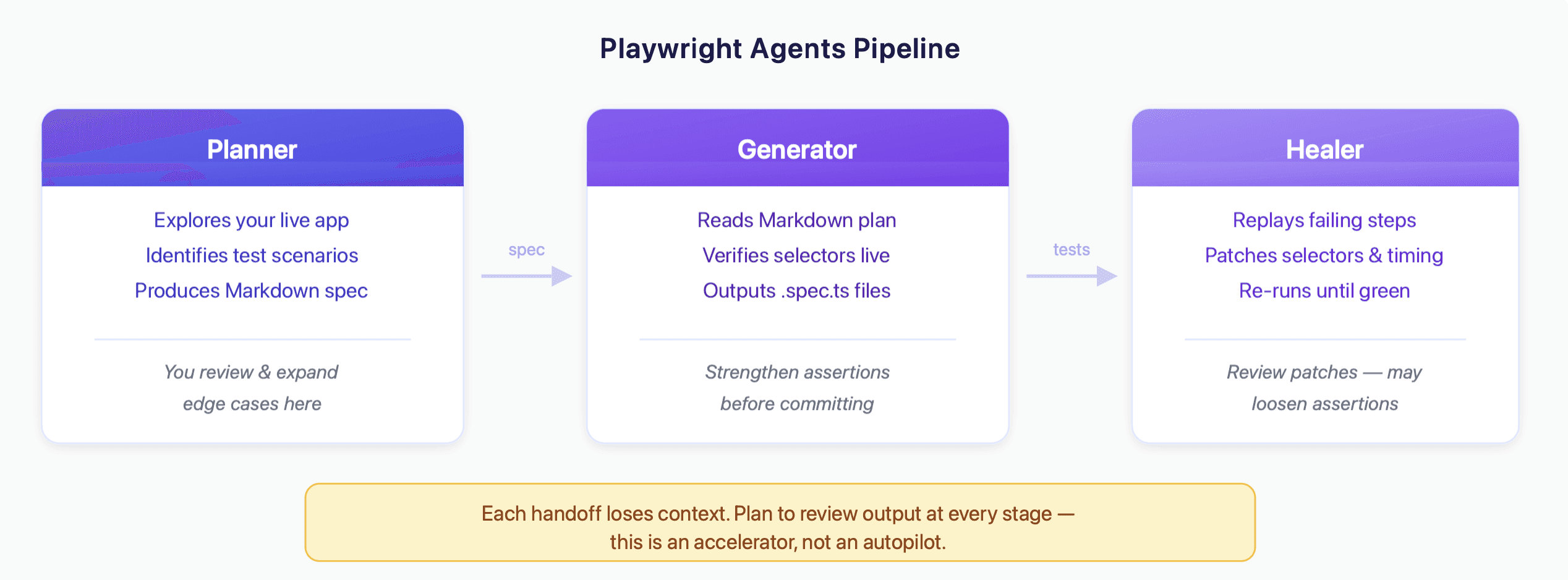
Playwright (v1.56+) ships with three specialized subagents designed for test automation with Claude Code. These provide more structure than raw MCP interaction, which helps when you're building out a larger suite.
Setup
This generates Markdown agent definitions in your project under .github/ and creates a specs/ directory for test plans and tests/ for generated tests.
The Planner
The Planner agent explores your application and produces a structured Markdown test plan.
The Planner navigates your app in a real browser, documents the flow, identifies scenarios (happy path, error cases, edge cases), and writes a Markdown plan saved to specs/. It's a useful starting point — though it'll focus on what it can observe in the UI, which means it tends to miss domain-specific edge cases (discount code expiration logic, enterprise-specific configurations, permission-dependent flows). Review and expand the plan before passing it to the Generator.
The Generator
The Generator takes the Markdown plan and produces Playwright test files.
It reads the plan, interacts with the live app to verify selectors, and outputs TypeScript test files. It generally follows good practices — semantic locators (getByRole, getByLabel), waiting strategies, structured assertions.
One thing to watch: the Generator's assertions tend toward checking that elements are visible rather than verifying business logic. A test might confirm the confirmation page appears without checking that the order total is correct, or that the right product name is displayed. You'll want to go through the generated tests and strengthen the assertions that matter most for your product.
The Healer
When tests fail, the Healer attempts to debug and fix them.
The Healer replays failing steps, inspects the current UI, identifies what changed (a selector, a timing issue, an assertion value), patches the test code, and re-runs until it passes.
The Healer handles selector breakage and timing issues well — the "someone renamed a CSS class" category of failures. It's less effective when a flow fundamentally changed (new steps added, a page redesigned), or when the test was wrong to begin with. Occasionally it "fixes" a test by loosening an assertion rather than updating it to match new behavior, so it's worth reviewing patches before committing them.
Chaining the agents
The full pipeline: Planner → Generator → Healer. Run the Planner for new features, the Generator to produce tests, and the Healer to maintain them. Each stage accelerates the work, though each handoff also loses some context — expect to review and refine the output at each step rather than treating it as a fully automated pipeline.
Practical tips
Provide a seed test. The Planner and Generator agents work significantly better when they have an example to follow. Create a tests/seed.spec.ts that handles your app's base setup (authentication, navigation to the starting state). Without this, agents spend most of their tokens figuring out how to log in.
Be specific about what you want. "Write tests for checkout" produces generic coverage. "Write tests for checkout with a saved credit card, checkout with a new card, checkout with an expired card, and checkout with a discount code" produces targeted, useful tests. The more context you give Claude about your product, the less cleanup you do afterward.
Budget for iteration. The workflow is rarely "prompt once, commit the output." A more realistic loop: prompt → review → strengthen assertions → re-run → adjust selectors → commit. Plan for 30-60 minutes per well-tested flow, not the 5 minutes that demo videos suggest.
Use the codegen flag for Playwright MCP. You can configure the MCP server to generate TypeScript alongside its actions:
This makes Claude output reusable Playwright code as it navigates, rather than just performing actions.
Review generated tests before committing. Check that assertions verify meaningful behavior (not just "element exists"), that selectors are stable, and that tests are isolated from each other.
Custom slash commands. Create reusable testing commands in .claude/commands/:
Then run /heal in Claude Code to trigger the workflow.
Where Claude Code + Playwright MCP falls short
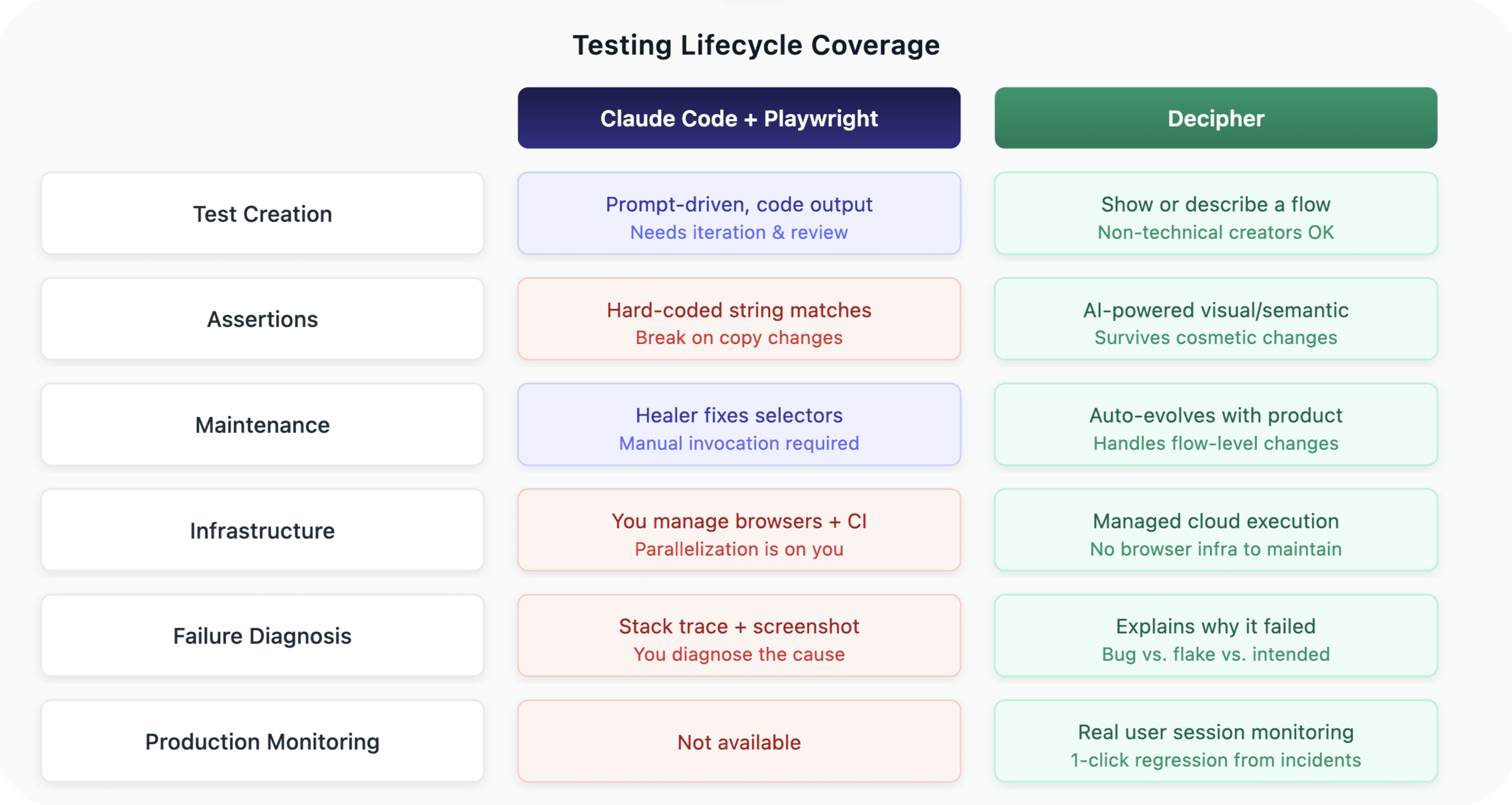
Maintenance is still manual. The Healer helps with selector-level fixes, but you need to invoke it. Tests don't self-heal in CI. When your product fundamentally evolves — a new onboarding flow, a redesigned checkout, added steps — the Healer can't rewrite tests to match. That's still on you.
No managed infrastructure. You're responsible for running browsers, managing test environments, handling parallelization, and integrating into CI/CD.
Assertions are string-matched. Playwright assertions are hard-coded: expect(page.getByText('Order confirmed')).toBeVisible(). If the copy changes to "Your order is confirmed," the test breaks. If the page loads but shows the wrong order total, the test passes. You're asserting the presence of specific strings, not whether the page semantically looks correct. Claude Code tends to generate these surface-level checks, and strengthening them is manual work.
Context window limits. Large test suites can exceed Claude's context window. Complex multi-page flows with heavy DOM structure can cause issues within a single session.
Cost scales with usage. Every interaction uses API tokens. Running the Planner across your app, generating dozens of tests, and healing failures all consume tokens that add up for larger suites.
No production monitoring. This is purely a test creation and maintenance tool. It doesn't watch real user sessions or alert you to bugs that escape your test suite.
No failure reasoning. When a Playwright test fails in CI, you get a stack trace and maybe a screenshot. Diagnosing whether it's a real bug, a flaky selector, or an intentional product change is on you.
When to use Claude Code + Playwright vs. a dedicated AI testing tool
Claude Code + Playwright MCP is a good fit when your team has Playwright expertise, wants full ownership of test code, is comfortable with a hands-on workflow, and values portability (standard Playwright output, no vendor lock-in).
A dedicated AI testing tool like Decipher (that's us 👋) covers the gaps in this workflow:
Managed cloud execution. No browser infrastructure to set up or maintain.
AI-powered assertions. Instead of brittle string matches, Decipher uses semantic, visual assertions — it understands that a confirmation page looks and behaves like a confirmation page regardless of exact copy. Tests don't break over cosmetic changes but still catch functional regressions.
Automatic test evolution. When your product changes at the flow level (not just a moved button), tests update to match the new behavior automatically.
Failure reasoning and customizable alerts. When a test fails, Decipher explains why — real bug, environment issue, or intentional change — with session recordings. Alerts route to the right team based on severity, ownership, or flow criticality.
Production session monitoring. Catches bugs that escape the test suite by watching real user sessions, with one-click regression test creation from incidents.
Many teams use both: Claude Code + Playwright for complex scenarios where they want full code control, and Decipher for broad automated coverage, ongoing maintenance, and production monitoring.
FAQ
Q: Do I need the MCP server, or can Claude Code write Playwright tests without it? A: Claude Code can write Playwright tests without the MCP — it generates code from its training data. The quality is noticeably better with the MCP because Claude verifies selectors against the real DOM instead of guessing. Without it, expect more manual cleanup.
Q: Can I use this in CI/CD? A: The MCP server is designed for interactive use (it opens a visible browser). For CI/CD, use the Playwright test files that Claude generates — they're standard Playwright and run headless like any other test.
Q: What's the difference between the official @playwright/mcp and @executeautomation/playwright-mcp-server? A: The official @playwright/mcp is Microsoft's implementation, optimized for accessibility-tree-based interaction (no vision model needed). The ExecuteAutomation version is a community alternative with some additional features. For most use cases, stick with the official package.
Q: How do Playwright Agents compare to Decipher? A: Playwright Agents are a developer tool for AI-assisted test writing. You invoke the Planner, review the plan, run the Generator, and trigger the Healer when things break. Decipher automates the full lifecycle: tests are created, maintained as your product evolves (including flow-level changes, not just selector patches), run on managed infrastructure, and paired with production monitoring and failure alerts with clear reasoning. Agents give engineers more control; Decipher gives teams more coverage with less ongoing effort.
Q: Can Claude Code handle authentication flows like OAuth or SSO? A: With the MCP's visible browser, you can manually log in (handling MFA, OAuth redirects, etc.) and then let Claude continue. For the generated test files, you'll need to handle auth programmatically — Claude can help write the setup code using Playwright's storageState feature.
Q: How many tests can Claude Code realistically generate in one session? A: Typically 5-15 well-structured tests per session before context window limits become a factor. For larger suites, break the work into focused sessions by feature area.
Written by:

Michael Rosenfield
Co-founder
Share with friends: